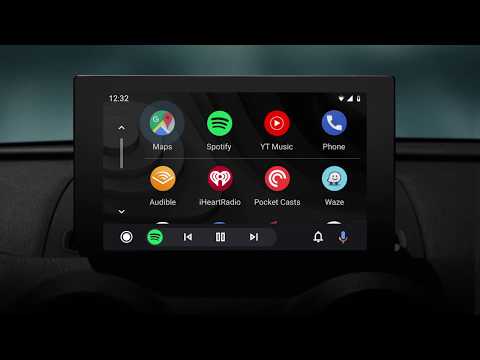
Download Android Auto
-
File verification, APKS for arm64-v8aSignature matches the developer’s certificate
Unmodified file: exactly the file the official app store serves, with the developer’s certificate, signed by Google Inc. (Android). A signature shows who signed the file, not how the app behaves. For APKS, the check covers the base APK: Android installs the other parts only if they are signed with the same key.
Signature checked
- Signed by
- CN=Android, OU=Android, O=Google Inc., L=Mountain View, ST=California, C=US
- Certificate SHA-256
- 1CA8DCC0BED3CBD872D2CB791200C0292CA9975768A82D676B8B424FB65B5295
- Certificate SHA-1
- A60BD681F4CEE6031CB6235B3E145BB1936C4E76
- Earlier key SHA-256
- FDB00C43DBDE8B51CB312AA81D3B5FA17713ADB94B28F598D77F8EB89DACEEDF
- The new key is confirmed by this earlier key.
- SHA-256 of the base APK (Android_Auto-18.0.664264-release.apk)
- ee9054ffc513dd317dea4e1cf3006ec368796249bb059269c680b16b9451991c
- Other parts of this APKS
- config.arm64_v8a, config.en, config.xxhdpi
- The .apks archive is packed on download.
- Signature schemes
- v3
- Reference
- Official app store
-
File verification, APKS for armeabi-v7aSignature matches the developer’s certificate
Unmodified file: exactly the file the official app store serves, with the developer’s certificate, signed by Google Inc. (Android). A signature shows who signed the file, not how the app behaves. For APKS, the check covers the base APK: Android installs the other parts only if they are signed with the same key.
Signature checked
- Signed by
- CN=Android, OU=Android, O=Google Inc., L=Mountain View, ST=California, C=US
- Certificate SHA-256
- 1CA8DCC0BED3CBD872D2CB791200C0292CA9975768A82D676B8B424FB65B5295
- Certificate SHA-1
- A60BD681F4CEE6031CB6235B3E145BB1936C4E76
- Earlier key SHA-256
- FDB00C43DBDE8B51CB312AA81D3B5FA17713ADB94B28F598D77F8EB89DACEEDF
- The new key is confirmed by this earlier key.
- SHA-256 of the base APK (Android_Auto-18.0.664263-release.apk)
- f7ea10e981b00593ac2310d0ab248aeab6f321f29befb307b76ad5585da9fd2e
- Other parts of this APKS
- config.armeabi_v7a, config.ru, config.xxhdpi
- The .apks archive is packed on download.
- Signature schemes
- v3
- Reference
- Official app store
-
File verification, APKS for x86Signature matches the developer’s certificate
Unmodified file: exactly the file the official app store serves, with the developer’s certificate, signed by Google Inc. (Android). A signature shows who signed the file, not how the app behaves. For APKS, the check covers the base APK: Android installs the other parts only if they are signed with the same key.
Signature checked
- Signed by
- CN=Android, OU=Android, O=Google Inc., L=Mountain View, ST=California, C=US
- Certificate SHA-256
- 1CA8DCC0BED3CBD872D2CB791200C0292CA9975768A82D676B8B424FB65B5295
- Certificate SHA-1
- A60BD681F4CEE6031CB6235B3E145BB1936C4E76
- Earlier key SHA-256
- FDB00C43DBDE8B51CB312AA81D3B5FA17713ADB94B28F598D77F8EB89DACEEDF
- The new key is confirmed by this earlier key.
- SHA-256 of the base APK (Android_Auto-18.0.664267-release.apk)
- 6c17c4ef07634dc699582a6336dcda60040767c0ee3a1ab4083aa10005093395
- Other parts of this APKS
- config.ru, config.x86, config.xxhdpi
- The .apks archive is packed on download.
- Signature schemes
- v3
- Reference
- Official app store
Android Auto 18.0.664264-release
Android Auto 18.0.664263-release
Android Auto 18.0.664267-release
Hi, There you can download APK file "Android Auto" for Android free, apk file version is 18.0.664267-release to download to your android device just click this button. It's easy and warranty. We provide only original apk files. If any of materials on this site violates your rights, report us